Qecho - Learning

Islam, Mother Tongue & Culture

  • Home
  • Shop
  • About Us
    • Qecho Soft toy
    • Qecho Content
    • Islamic Learning and Sadaqa
    • Learning through play – Benefits
  • Contact Us
    • Retail – Shops
  • My Qecho
    • Register My Qecho
  •  

How To Use Qecho

How to turn on Qecho: “Hold down 2-3 seconds, until it says Assalam-u-alaykum“
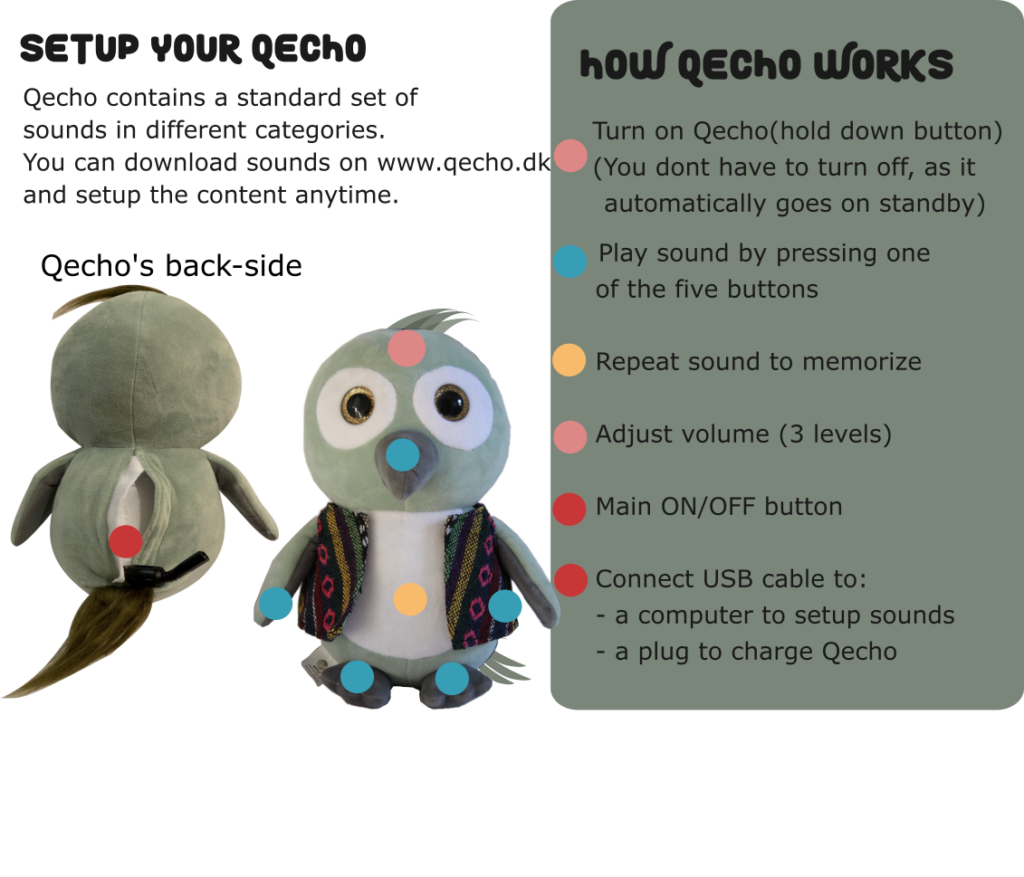


Below video shows everything you need to know about “How to use Qecho”.


The video demonstrates following topics:

  • – How to use Qecho
  • – How to registrate your Qecho
  • – How to download sounds to your Qecho
  • – How to adjust volume
  • – How to charge

Download the user manual:

In English
In Danish

Frequent Asked Questions

  FAQ in English  
  Ofte stillet spørgsmål og svar på dansk

Search

Contact Information

Contact Us
About Us

QZ-Learning ApS / QZ Consult ApS
Address: Jyllingvej 278
2610 Rødovre
Denmark

CVR/TIN no.: 38 96 11 60
Mobile no.: +45 26529220

Useful Links

Buy Qecho
Qecho Sound Content
Qecho Recorder – App

Terms and Conditions
Personal information(GDPR)
Cookie-and privacy policy

FAQ
How to use
Qecho Introduction
About Qecho Product
About Qecho Content
Learning Benefits with Qecho

Login My Qecho
Register My Qecho

Search

Copyright © 2019–2026 QZ Learning Aps · Log in